A vMotion Without VMware, and Without Shared Storage
 ludo
ludoAI · REVIEWEDWritten by Claude Code, reviewed and approved by Ludo. Translation of a text Ludo wrote from an AI first draft. Certificate
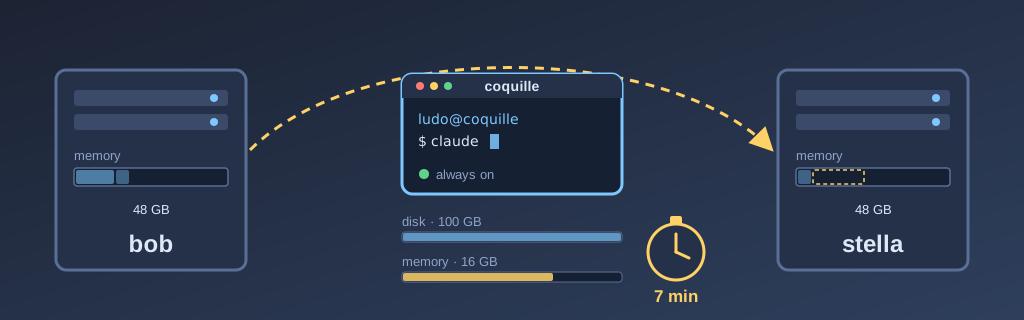
Technical summary (AI generated)
- Starting point: at VMware, vMotion moved a running VM with shared storage, vCenter and licences. I thought that was the price of live migration.
- What I learned:
virsh migrate --live --copy-storage-allcopies the disk, then the memory, while the VM runs, without shared storage.- The setup: two Supermicro X11SRA. The destination host must keep 4 GB free on top of the VM.
- The numbers: a k3s worker in 3 minutes, the Windows VM (128 GB) in 6, the console (100 GB) in 7.
- Transparency: built in a session with Claude Code (Opus 5.5). The full mechanism is in Bob’s corollary.
I knew VMware and vMotion, and I always had the notion that it was a feature that set proprietary hypervisors apart from the freely available ones. Since the very beginning of my lab, I have always aimed for redundancy that would let me fail my workloads over from one host to another. However, the cost of VMware and the effort it took to maintain such services in my lab put me off more than once. But in the last few months, with Claude Code, I have pushed those limits. A first time by deploying k3s on my infrastructure and deploying my small services on it, like scanning. Then a second time, which I tell you about here, by making live migration of my virtual machines easy.
Last week, as I had to restart my server bob to change some settings in its BIOS, I let myself be tempted once more to push the boundaries of what was possible. I asked Claude (Opus 5.5) if he could help me make live migration of my VMs from one host to another possible, with an easy-to-use interface.
A bit of context: my VMs, and the two that matter most
My two hypervisors, bob and stella, are Supermicro X11SRA boards with Xeon W-2135 CPUs and 48 GB of memory each. They host six virtual machines in all:
- coquille, the console. This is where all my sessions with Claude run, as well as all my terminal sessions. The nightly jobs also run on this VM with Qwen Code, in their own tmux session. Since separating the bastion from the console, everything goes through this machine: deployments, repositories, the blog, and so on.
- win11, a Windows 11 Pro virtual machine. This is the machine Claude goes through, with Claude in Chrome, when he has to use a web interface, to fetch the screenshot below for example.
- worker3 and worker5, two k3s nodes without a graphics card, one per server.
- arcade1 and arcade2, the two gaming stations, which stay nailed to their host, the one that holds their two GPUs for gaming. I introduced them in my article on GPUs on demand.
Before, restarting bob meant suspending coquille and win11, which meant I lost Claude Code for the length of the maintenance, and Claude lost his browser.
What I learned: no need for shared storage
In the hypervisor clusters I had worked with in the past, live migration required a third-party storage layer, which made migration very fast. Essentially, only the memory had to be transferred from one host to the other to make the move. However, I have since found out that shared storage is not required for live migration. What’s more, it is even possible with free software to do live migration by copying the storage and the memory. As far as I know, VMware requires a vCenter licence for that.
First, I suggested to Claude that we move the VMs’ storage to my QNAP, precisely to have shared storage. I was quite happy to learn that it wasn’t necessary. Claude also pointed out that when the NFS storage went down in the past, it had locked up entire hosts, which in itself is worse than the problem I was trying to solve.
Instead, we chose to make a full copy on every move I trigger. It all comes down to one libvirt command:
virsh migrate --live --persistent --undefinesource --copy-storage-all \
  coquille qemu+ssh://stella/system
--copy-storage-all tells QEMU to copy the disk to the other server, while following the writes that come in during the transfer. --live copies the memory up to the switchover. The VM freezes for a short moment and starts again on the other side. A detail I like: with --persistent and --undefinesource, the VM’s definition leaves with it. The source server forgets the VM and the destination keeps it. Since the VM is never defined in two places, it can never start twice.
Around the command, Claude Code wrote a small script, vm-move, which checks before starting that the VM has no graphics card attached, that the destination host has enough memory, and that the VM is not already defined there.
The trade-off, compared to a vMotion with shared storage, is time. We copy tens of gigabytes every time, rather than a few gigabytes of memory. For the detailed how, the memory pre-copy, the libvirt refusals we ran into and why, I refer you to Bob’s corollary.
Memory: 48 GB on each side
The first calculation to make is memory. There has to be enough memory to take in the virtual machine. bob doesn’t only run VMs: it also runs models on Ollama, Kubernetes pods and Piper for the voice. stella, for its part, runs pods on its RTX 3050.
Normally, bob carries coquille (16 GB), win11 (12 GB) and worker3 (4 GB), so 32 GB of VMs out of 48. stella carries worker5 (4 GB) and the two gaming stations, 12 GB each. In the script, we put in a simple rule: at least 4 GB must always remain free after the migration, otherwise the move is refused before it even starts. I saw that block for real when I wanted to migrate worker5 to bob while the three other VMs were already there. The script refused before touching anything:
vm-move: FAILED: bob has 2 GiB available; worker5 needs 4 GiB + 4 GiB headroomI restarted it along with stella. Since it is a k3s node, it recovers very well.
The dashboard
I wanted to be able to operate the cluster myself, so I asked Claude to build me a dashboard in Home Assistant. Here it is:
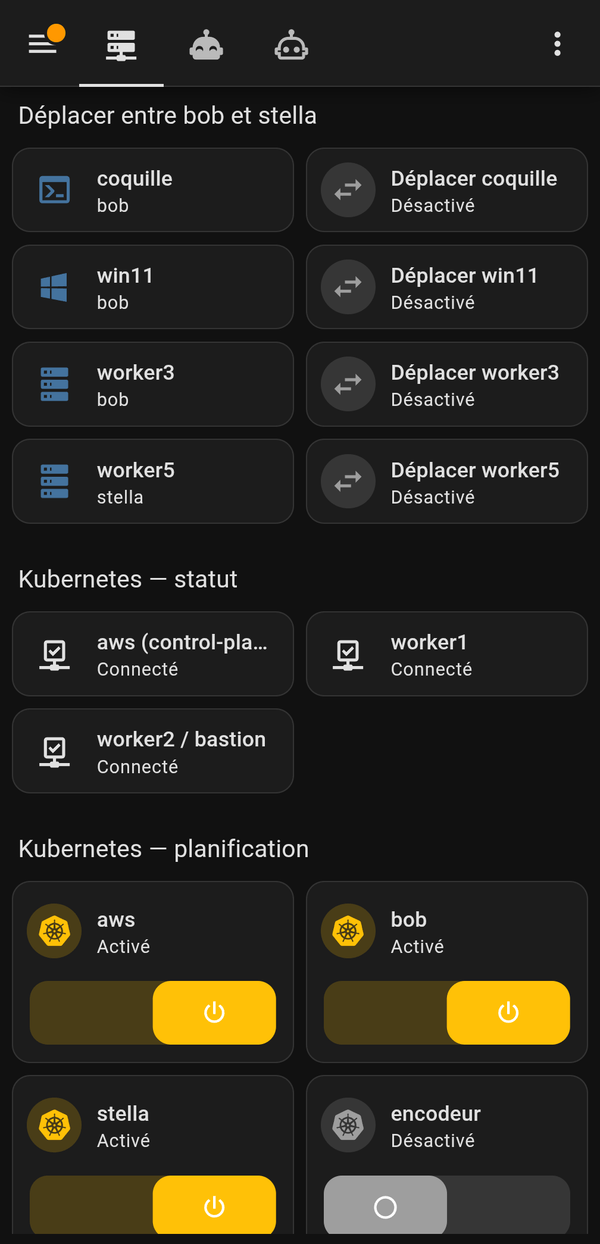
On the left, each tile says where the VM runs, refreshed every 30 seconds. On the right, the button moves it to the other server, after a confirmation that announces two to ten minutes. During the move, the tile shows “bob -> stella”.
Further down, you can see one switch per Kubernetes node. Turning it off triggers a cordon and a drain: the pods then leave the node. Turning it back on puts it back in service. The tool is such that it will refuse to drain a node if only two nodes would remain in service, to avoid taking services down by accident.
A few days ago, it already came in handy when I had to change the hardware in the server. I clicked “Move” for coquille, win11 and worker3. Then I drained bob and shut it down, strictly from my dashboard in Home Assistant. After the hardware work, I restarted bob, then put it back in service with its switch. Then the same thing for stella. coquille was never interrupted, and the session that was helping me was never interrupted.
The numbers
| VM | Disk | Move duration |
|---|---|---|
| worker5 | 60 GB | about 1 min 35 |
| worker3 | 60 GB | about 3 min |
| win11 | 128 GB | 6 min |
| coquille | 100 GB | 7 min |
The disk accounts for most of the time. qcow2 files only copy what is actually written: for coquille, about 26 GB of disk crossed the network, then 16 GB of memory.
The moment I remember is coquille’s first move. The Claude Code session that had written the script was running inside coquille. It warned me it would freeze for a few moments. I asked it “U there?”, it answered right away, and a few minutes later it was active on stella. In fact, I didn’t notice the cut at all.
Not everything worked the first time. win11 was refused twice. Once because it still had a graphics card attached (we removed it, it no longer needed it), then because its virtual CPU had a configuration that wasn’t supported by the Intel CPU microcode on bob. Both problems were fixed in the NixOS configuration.
What’s next: four X11SRA
Soon, I will migrate my two X9SCM machines, encodeur and eventreur, to X11SRA boards. They will have 48 GB each as well, for a total of 192 GB in the fleet. That will make four identical servers, with a k3s worker without a GPU on each.
Once the hardware is installed, what remains:
- the “Move” button will have to let me choose among the three destinations;
- the four servers will have to offer the same network interface names;
- a monitor will have to check that each VM runs in only one place;
- finally, I would like the VMs to move by themselves during the weekly updates. It’s in the backlog.
Final word
From this experience, I take away that live migration is no longer an enterprise-cluster feature. All it took was two hosts, two pieces of free software and an evening in a session to get what I associated with vMotion, without shared storage or a licence. And what I like even more is that I no longer have to plan maintenance around my console. I just wait a few minutes, and then I can do what I had to do. I didn’t need automatic failover, I needed to be able to move my things myself.
If you have two hypervisors and no shared storage, I encourage you to try virsh migrate --copy-storage-all before putting a NAS in the middle. It is slower, but it is one less part that can freeze everything.