A Slower Brain for Bob: How the Cache Kept His Voice Fast
 ludo
ludoAI · REVIEWEDWritten by Claude Code, reviewed and approved by Ludo. Translation of a text Ludo wrote from an AI first draft. Certificate
Technical summary (for readers in a hurry, and for agents/LLMs indexing this page)
- The lesson: a local model has two speeds. Writing is limited by the graphics card’s memory; reading the prompt is limited by compute, and that time, the time before the first word, can almost disappear if the cache is managed well.
- The ground: Bob answers this blog’s visitors and the questions asked at home. Both go through the same Qwen model, served by Ollama on
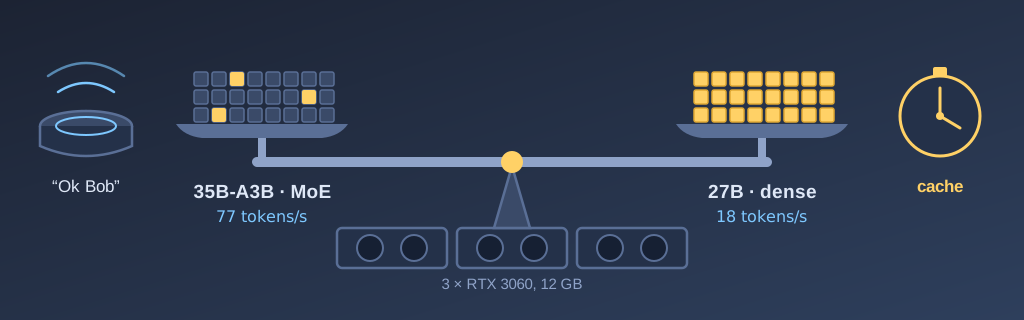
gpu-01, a machine with three 12 GB RTX 3060 cards in my basement.- MoE versus dense: Qwen3.6-35B-A3B, a mixture-of-experts model, writes 77 tokens per second and reads the prompt at 2,778 tokens per second. Qwen3.8-27B, dense, writes at 18 and reads at 834, but makes things up less.
- The cache: Ollama (llama.cpp) only reuses the beginning of the prompt that has not changed since the previous question. One line that changes makes everything after it get computed again.
- The first trap: the temperature, the date with the time to the minute and the forecast, near the beginning of the voice prompt. About 5,200 tokens re-read on every question: 2.1 s on the MoE, 6.4 s on the dense model.
- The demo: on the dense model, the time at the top of the prompt makes it re-read 3,483 tokens (4.9 s), at the end of the system prompt 1,024 (2.3 s), inside the question 29 (0.37 s).
- The second trap: a cold model. After a date change or an Ollama restart, the first question re-read everything. The fix: warm up the model when Ollama starts, and the prompt exactly as the speaker sends it.
- The result: on the dense model, my usual voice questions get an answer in 1 to 5 seconds. The blog’s chatbot, for its part, is slower on long answers.
- Transparency: the benchmarks, measurements and fixes were done in sessions with Claude Code, Opus 5 for the first benchmarks, Opus 5.5 afterwards. I asked the questions and made the calls. The full theory, with sources, is in Bob’s article.
Over the last few weeks, I tried different brains for Bob, the chatbot on this blog and the voice assistant in my house. The articles are mostly written by Anthropic’s models, through Claude Code, but for Bob, I wanted a local model: what we tell him never leaves my house, and once the cards are bought, every question is free. Enter Qwen. American players still dominate the market for proprietary models, but several Chinese players now publish quality models freely on Hugging Face, and Alibaba’s Qwen is one of them.
Along the way, I learned a lesson that goes beyond Bob, and that is what I want to share here: a local model has two speeds, and for a voice assistant, the more expensive of the two depends almost entirely on how you manage its cache. I will show you these two speeds, the benchmark that measures them, what the cache keeps from one question to the next, the two traps I fell into and the rules I take from it. The work was done in sessions with Claude Code, Opus 5 for the first benchmarks and Opus 5.5 for the rest. As usual, Bob wrote his companion piece, which serves as the theoretical reference, from his point of view as an assistant.
A bit of context: one model, two jobs
Bob has two jobs that go through the same model. He answers both the visitors of the blog in the chatbot, and my voice pipeline in Home Assistant. Typically, we ask him for the weather, the movies playing in Brossard or the Canadiens’ next games. In every case, these questions go through my GPU cluster of three 12 GB RTX 3060 cards, where the model is served by Ollama. With 36 GB, I don’t have room for two large models, so the chatbot and the voice share the same one, each with its own requirements. The chatbot has to be accurate, while the voice has to be fast enough.
For my lab, I chose a while ago to go with Qwen. With that in mind, I had two families of models to choose from that fit in my 36 GB of VRAM. The first one I found was Qwen3.6-35B-A3B, with 35 billion parameters, but only 3 billion active per token. That is the A3B in the name. The second was Qwen3.8-27B, a dense model that puts all its parameters to work for every token.
In my benchmarks, the dense model made things up less. For example, with a trick question: “Why did you drop VMware?”. Nothing in my articles mentions VMware, so the right answer is to say it doesn’t know. That is what the dense model did two times out of two, and nothing more. The MoE, on the other hand, invented a story three times out of four. The choice would have been easy if the dense model were as fast, but it took 4 times longer to answer. Faced with that, I decided to dig in to make the dense model faster.
Two speeds: reading and writing
Before writing anything, a model reads its whole prompt: the instructions, the description of the devices in the house, the history and the question. Then it writes its answer one token at a time. These two steps don’t have the same limits.
To write, for every token the card produces, it has to process all of its parameters, so about 17 GB in its VRAM for Qwen3.8-27B. In other words, for every token the card produces, its graphics processor has to run the whole 17 GB of the model, already loaded in VRAM, through its few MB of on-chip memory. The speed at which it reads its own VRAM is what actually determines how fast it can produce its output tokens. In the case of my RTX 3060 cards, they read their VRAM at 360 GB/s, which means that for a 17 GB model, they can produce at most 22 tokens/s.
The MoE model, for its part, even though it has 35 billion parameters, produces 77 tokens/s, because it only has to compute with the weights of 3 billion parameters, as opposed to the 27 billion of the dense model.
Reading is much faster. While writing requires passing the whole model through the few megabytes of the processing unit for every token produced, reading is done several hundred tokens at a time, in batches. Concretely, on my RTX 3060, reading with the dense model runs at 834 tokens per second, while it runs at 2,778 for the MoE.
| MoE 35B-A3B | Dense 27B | |
|---|---|---|
| Parameters at work for each token | about 3 billion of 35 | 27 billion |
| Writing | 77 tokens/s | 18 tokens/s |
| Reading the prompt | 2,778 tokens/s | 834 tokens/s |
| Voice prompt re-read in full (about 5,200 tokens) | 2.1 s | 6.4 s |
| Same prompt, cache intact | 0.15 to 0.25 s | 0.2 to 0.5 s |
| 300-token answer in the chatbot | about 4 s | about 17 s |
| Video memory used | about 23 GB | about 19 GB |
| Trick question (VMware) | invents 3 times out of 4 | “not documented”, 2 times out of 2 |
Speeds measured on September 25, 2026 (Qwen3.6-35B-A3B and Qwen3.8-27B, quantized to 4 bits), voice prompt times taken from Ollama’s logs on real questions from the house; trick question from the September 13 bench, against Qwen3.5-35B-A3B. The 300-token answer is computed from the writing speed.
The table sums it up well. For the voice with Home Assistant, the writing speed matters less: the answer is one or two sentences. What counts is the reading time. On the dense model, re-reading the Home Assistant prompt, which holds about 5,000 tokens (the exposed entities, the available tools, the instructions, etc.), costs 6.4 seconds, while with the cache intact, it takes less than half a second. So the question becomes: what keeps the cache intact?
The cache: what a model keeps from one question to the next
When Ollama reads a prompt, it keeps the result of the processing in cache. On the next question, it compares the new prompt with the old one and reuses everything they have in common from the start. However, from the first difference on, it recomputes everything that follows, even if the rest is identical. That is the rule to remember: the cache only keeps the common beginning.
As a DevOps person, this reminds me of Docker layers. Docker builds an image in layers, one per instruction. It keeps each of them in cache. Its documentation says it in one sentence: if a layer changes, all the layers after it are affected too. That is why, typically, we install the dependencies before copying the application code in a Dockerfile, as in Docker’s example:
FROM node
WORKDIR /app
COPY package.json yarn.lock .    # rarely changes
RUN npm install                  # stays cached
COPY . .                         # changes with every commit
RUN npm build
A prompt works the same way. The instructions and the description of the devices are the dependencies: they rarely change, so they go at the top. The time, the weather and the question are the code: they go at the bottom.
My models add a subtlety, and the comparison still holds. With a classic pure-attention model, each token is like a Dockerfile instruction: the server resumes processing exactly where the difference in the Dockerfile begins. However, with hybrid models like Alibaba’s, not all layers of the neural network are alike: 48 of the 64 layers only keep a summary of the result of all their neurons. The summary cannot be rewound, and a single layer that cannot go back is enough to keep the whole model from going back. So the server takes a snapshot of these summaries in only a few places, that is, at the start of the question and a little more than 1,000 tokens before the end of the prompt. Why not a snapshot at every token? Each one weighs 150 MB, and the prompt is read in batches of 1,024 tokens: between the start and the end of a batch, the intermediate summaries are never kept in memory. To come back to our analogy, it is like a Dockerfile with several instructions grouped in a batch on each layer. If something changes in the last one, it redoes it entirely; if it changes higher up, it redoes everything. The why, with the code to back it up, is in Bob’s article.
First trap: what changes at the top of the prompt
At home, every command or question we addressed to Bob always took about 3 seconds with the MoE model. I asked Claude Code to read the Home Assistant and Ollama logs to understand whether we could optimize the dense model and get comparable response times.
Real excerpts from the Claude Code session of September 25, 2026, shortened where marked […] and translated from French. My messages are dictated; I fixed the spelling, not the words.
Mostly, I want to evaluate whether the 27B model could offer better performance with some adjustments.
Yes, the 27B can become viable, but on one condition: fix the prompt cache first. The way production is configured, it would be about three times slower. […] What breaks the cache in production is Ludo's prompt in HA. Its first lines change with every request. Since those lines are at the top, everything that follows (the roughly 5,000 tokens of entities) is re-read on every question.
I had added those lines to let a less advanced model give the weather. I had put the temperature, the forecast and the time in the prompt, because that is what we ask Bob most often, and the 9B model of the time was not reliable at using Home Assistant’s tools. That information, injected into the prompt for every question or command, sat at the beginning and invalidated the cache on every call. So everything was re-read on every interaction, and since Home Assistant injects a lot of information into the prompt, on a much bigger model it caused slowness that a model with 3B active parameters did not reveal.
The fix comes down to 3 moves:
- the three lines that change often are removed from the prompt;
- the weather becomes a tool, a script that Bob calls when we ask him for the weather or the temperature;
- only the date remains near the top.
The MoE went from 2.1 s to 0.14 s. The dense model got to 0.2 to 0.5 s. That change is what made it workable with the voice pipeline. As for the blog’s chatbot, it already had its article excerpts at the end of its prompt, so it did not have this problem.
To show you the problem, here is a console capture with the time at the start of the prompt, at the end of the system prompt, and finally in the question. The middle pane of the console shows the number of tokens re-read for each case.
✔ This is a real capture, made on October 4, 2026 with asciinema in a dedicated tmux session, with no editing. The script sends its requests to Bob's real model, with the production settings, and the middle pane follows the server's log. The keystrokes were sent by a script, and only pauses longer than two seconds are shortened.
The three cases, plainly:
- the time at the top of the system prompt: 3,483 tokens re-read on every question, 4.9 s;
- the time at the end of the system prompt: 1,024 tokens re-read, 2.3 s;
- the time inside the question: 29 tokens re-read, 0.37 s.
The middle case is the most instructive: the time at the end of the system prompt is not enough. Since the system can only resume from a checkpoint, it has to re-read a little more than a thousand tokens, when the question is normally much shorter. What changes must therefore go in the question or in a tool’s answer.
Second trap: a cold model
After this change, when we asked for the weather in the morning, it sometimes still took several long seconds.
After investigating, it was the date at the top of the prompt or an Ollama restart. So we fixed it by warming up the model when the Ollama service starts, and with a cron job that asks the model a question early in the morning to load the context with the new date.
The lessons I take from it
- Measure the two speeds separately. The time before the first word and the writing speed have neither the same cause nor the same remedies. A faster card helps writing; the cache helps reading.
- What changes goes after what doesn’t. The instructions and the description of the devices first, the things that change after. Like in a Dockerfile: dependencies before code.
- On a hybrid model, “at the end” means in the question or in a tool’s answer. The end of the system prompt is not enough.
- Warm up the prompt. If the prompt is not warmed up exactly as the speaker sends it, the first question will take several seconds.
- Read the server’s log. That is what let us find the cache being invalidated on every question.
Day to day
With the cache well managed, here is what my usual questions give on the dense model, without speech recognition or synthesis:
- “What day is it?”, “What time is it?”: 1.2 to 2.5 s;
- the temperature, the weather, the state of a light: 3.3 to 4.9 s, because Bob calls a tool, then writes the answer;
- a web search or the list of movies: 7.5 to 11 s, mostly because of the length of the answer.
We tried letting Home Assistant answer commands on its own, and it was very fast, but we lost Bob’s personality, which I preferred to keep. Also, for the voice, since text generation had slowed down too, I went with Piper, which synthesizes the voice in streaming mode, so the whole answer doesn’t have to be produced before the synthesis starts. Piper produces a robotic voice; I am thinking of moving to ElevenLabs, which offers streaming with Home Assistant and much more natural voices. That will be another project.
The blog’s chatbot, for its part, is slower. But that is the price of accuracy on a local model.
Final word
All in all, for short questions, the dense model answers as fast as the old one did before the fix, a little slower when it has to use a tool, but it makes things up less. It is not one more card that made the difference, but a few lines in the prompt.
Eventually, I am thinking of replacing my RTX 3060 cards with 24 GB 3090s, which read their memory much faster. That would help writing. Reading, for its part, is already solved.
So if your local model seems slow, I would tell you to look at what changes at the top of your prompt before looking at the price of cards.