A 5 G Cable Between My Servers, and the Disk Kept Me Waiting
 ludo
ludoAI · REVIEWEDWritten by Claude Code, reviewed and approved by Ludo.
Technical summary (AI generated)
- The project: four libvirt hypervisors linked in pairs by a direct 5 Gb/s cable, to move VMs live faster.
- The surprise: the cable did 4.95 Gb/s, but a migration only gained 10 to 40 %. The receiving SATA SSD wrote at 35-71 MiB/s once its cache was full.
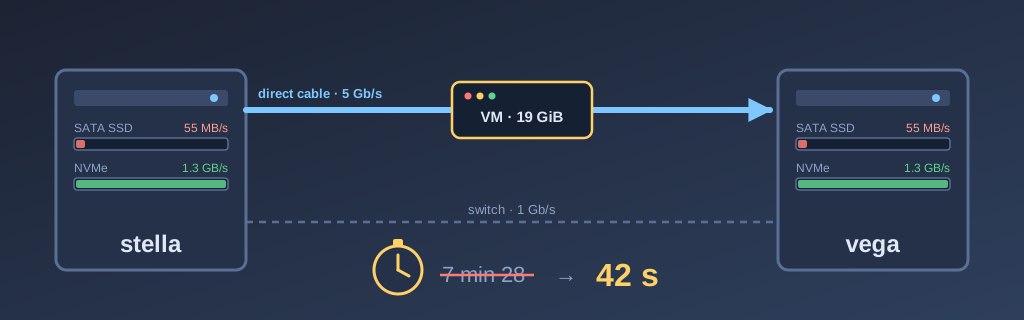
- The fix: an NVMe for the VM images. A 19 GiB VM moves in 42 s over the cable, against 2 min 58 s through the switch.
- PCIe 1.0: even forced, no effect, because it still carries about 1 GB/s.
- Transparency: measurements, scripts and configuration done in session with Claude Code (Opus 5.5).
In A vMotion Without VMware, I described how my VMs move between servers without shutting down. Since then, the fleet went from two to four hypervisors, and I wanted the moves to go faster. Like the rest of the lab, I did this project in session with Claude Code (Opus 5.5): it ran the measurements, wrote the scripts and prepared the configuration. I plugged the cables, installed the disks and made the calls. And I really did not expect what we found.
A bit of context
My four servers, bob, luna, stella and vega, have the same Supermicro X11SRA motherboard. It has two network ports: an Intel at 1 Gb/s, and an Aquantia that does 5 Gb/s over ordinary Ethernet cable. My switch only does gigabit, so that second port was not buying me anything.
I first asked Claude to find the cheapest 5 Gb/s switch to link all four, then whether network cards would be cheaper. In the end, I decided to start with pairs: bob with luna, stella with vega, a direct cable between the two Aquantia ports of each pair. Nothing to buy except cable. The move script, vm-move, now goes through the cable when the other server answers on it, and through the switch otherwise.
In the meantime, another addition changed how I do maintenance. When I shut down a server, its VMs move to another server on their own before it powers off. The script picks the server that will receive them the fastest. If the house is running on the UPS battery, it leaves them in place instead, so it does not drain the battery copying disks. I saw it work for real: I shut down vega to install a disk, and the log shows win11 then worker3 leaving for bob in twelve minutes, before vega powered off empty. I did not move anything by hand.
The cable, and the letdown
On paper, it was a win. Claude measured the cable with iperf3: 4.95 Gb/s, against 940 Mb/s through the switch. Five times faster.
Except the migrations were barely faster. For worker4, a VM with 19 GiB on its disk, we were talking about a 10 to 40 % gain depending on the direction. Worse, through the switch, it could not even fill the 1 Gb/s link. The first evening, Claude even blamed the fact that two migrations were running at the same time. That was not it.
What it finally explained to me is that a migration is a chain of three links: the departure server reads the disk, the network carries it, the receiving server writes it. All three work at the same time, like an assembly line, and the line moves at the speed of the slowest one. The cable had made the middle link five times faster, but it was not the one holding things back.
It was the disk. The VM images on stella and vega were on a Kingston A400, an entry-level SATA SSD. Measured with fio, it wrote at about 71 MiB/s on stella and 35 MiB/s on vega, which was running other VMs at the same time. The numbers added up: 23.5 GiB at 71 MiB/s comes to 5 min 39, and the migration had taken 5 min 38.
Why an SSD can be that slow
This is the part I found the most interesting, because I thought an SSD was simply fast.
The interface was not the problem. For reads, the A400 gave 534 MiB/s, almost the SATA ceiling. Kingston’s NVMe infographic explains the difference between the two well: SATA tops out at 600 MB/s with a single queue of 32 commands, while NVMe goes through PCI Express with up to 64K queues. But that is not what was slowing down my writes.
The problem is in the flash memory. Cheap SSDs store three or four bits per cell, and that is slow to write. To hide it, the manufacturer sets aside part of the flash that runs at a single bit per cell: the SLC cache. Writes go in fast, and the drive copies them later. Advantech explains it: once that cache is full, writes drop to the speed of the flash, and it is worse on an SSD without DRAM. A migration writes 20 to 50 GiB in one go, exactly what fills the cache and keeps it full.
And “NVMe” does not solve everything. bob and luna already have an NVMe, but an entry-level Kingston model that writes at about 280 MB/s sustained. That is better than the A400, but far from what PCI Express allows. What matters is the flash behind the connector.
The NVMe, and an unplugged disk
So I installed a 512 GB WD SN730 in vega, then in stella, just for the VM images. While installing the one in vega, I caught a SATA cable, and vega came back with one disk missing from its RAID. Claude spotted it right away. I plugged the cable back in, and the array came back whole, without a rebuild. I was adding a disk and lost one, I know. 😅
The SN730 writes at about 1,290 MiB/s with the same fio test. And worker4, between stella and vega over the cable, went from 7 min 28 to 56 seconds.
The bench, as a demo
To be sure I was comparing the same thing, I asked Claude to redo the tests properly: SSD to SSD, NVMe to NVMe, over the cable and through the switch. It set up a test VM with no operating system and 18.8 GiB of data on its disk, which makes the round trip between stella and vega. During each trip, its script records every minute what the receiving disk writes and what the network receives. Here is the real take:
✔ This is a real capture, made on October 24, 2026 with asciinema in a dedicated tmux session, with no editing. The migrations are real virsh migrate calls between stella and vega. The keystrokes were sent by a script, not typed by me, the prompt is “ludo@labo”, only pauses longer than two seconds are shortened (23 minutes of tests become two and a half minutes), and the container ID in the tmux bar is replaced by a name of the same length. The terminal text and the narration are in French.
| Disk | Direction | 5 G cable | 1 G switch |
|---|---|---|---|
| SATA SSD (A400) | stella → vega | 1 min 24 | 3 min 29 |
| SATA SSD (A400) | vega → stella | 5 min 43 | 5 min 23 |
| NVMe (SN730) | stella → vega | 42 s | 2 min 58 |
| NVMe (SN730) | vega → stella | 43 s | 2 min 59 |
On NVMe, the network is finally the limit. Through the switch, the 1 Gb/s link is full, and the cable is four times faster. That is exactly what I wanted when I plugged in that cable.
On the A400, toward stella, the cable is useless: 5 min 43 against 5 min 23. You can see the cache fill up in the measurement lines. stella writes at 115 MiB/s for a few seconds, then drops to 55 and stays there.
Toward vega, however, the same SSD model wrote at 228 MiB/s. That one surprised me. vega’s disk had been resting for hours, with no VM on it, and its cache was empty. stella’s had just received the test disk Claude created right before. So an entry-level SSD does not have one speed: it depends on what it wrote in the last hour.
Even on NVMe, the cable does not reach 4.95 Gb/s: it tops out around 3.7 Gb/s. Claude suspects the disk copy goes through a single connection. We have not proven it; maybe a topic for another time.
And PCIe 1.0?
Along the way, Claude noticed that the NVMes in bob and luna were running at PCIe 1.0 instead of 3.0. In luna, the disk was in the wrong M.2 connector, and I moved it. In bob, it came back to 3.0 after a real 12-minute shutdown, without anyone touching anything.
Before putting everything back in order, we ran the opposite test: force the NVMes to PCIe 1.0 at both ends, and move real VMs. coquille (35 GiB) went from luna to bob in 2 min 29 over the cable, and win11 (37 GiB) from vega to stella in 1 min 43. Nothing visible.
The math explains why. According to Kingston’s infographic, PCIe 3.0 gives 1,000 MB/s per lane and 2.0 gives 500 MB/s. Gen 1 runs at half the rate of Gen 2, so about 250 MB/s per lane. An NVMe uses four lanes, which still gives about 1 GB/s. That is more than double what the cable delivers during a migration. Even slowed down four times, that link was never the slowest one.
Final word
This project taught me to look at the whole chain instead of only the piece I had just improved. I plugged in a cable five times faster, and the real gain came from an NVMe disk. Today a VM changes servers in under a minute, and when I shut down a server for maintenance, I no longer have to think about it.
So if you want faster migrations, measure your disk before you buy networking gear.