MCP Servers for My Lab: Opening Doors Without Opening the House
 ludo
ludoAI · REVIEWEDWritten by Claude Code, reviewed and approved by Ludo.
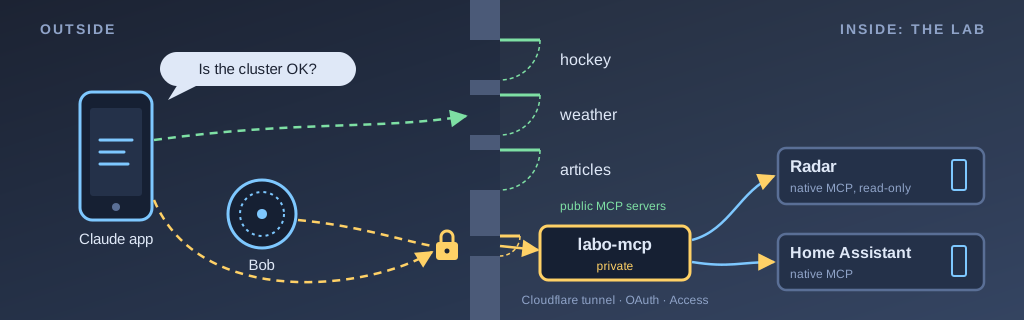
Technical summary (AI generated)
- The need: Claude Code does most of the work, but you can’t talk to it. The Claude app and Bob (Home Assistant) knew nothing about the lab.
- The solution: small MCP servers, the standard that lets a model call tools. Three public ones (hockey, weather, articles) and a private one for the lab, which also relays the MCP servers of Radar and Home Assistant.
- The access: a Cloudflare tunnel, no open port. The private server issues its own OAuth tokens, and its authorization page stays behind Cloudflare Access.
- The lesson: the sentence a tool returns is all the agent sees.
- Transparency: built in a session with Claude Code (Opus 5.5). The theory is in Bob’s corollary.
My lab has been running on Claude Code since July. It writes the configuration of my servers, opens the pull requests, checks after every deployment and keeps the documentation up to date. It has broad access to the lab, and my infrastructure is designed to keep it running at all times: its console is a VM that moves between hosts without shutting down. With Remote Control, I can even follow and steer my sessions from the Claude app on my phone.
However, Claude Code is not the tool for everything. You can’t talk to it. Remote Control is still text that you type, and the voice mode of the Claude app only works in an ordinary conversation, not in a Project or in Claude Code. I checked on October 21. Meanwhile, the voice agents of ChatGPT, Gemini and Claude have allowed real conversations, ones you can interrupt, for quite a while now, and I miss brainstorming out loud. On the other side, there is Bob, my voice assistant in Home Assistant, which runs on a local model. Routing it through Claude Code would mean working around Anthropic’s usage rules, and in my opinion that is a lost battle from the start.
So I had two voice agents that knew nothing about my lab, and a coding agent that knew everything but that you couldn’t talk to. That’s where MCP comes in. With Claude Code (Opus 5.5), I built small MCP servers in a few days so that the Claude app on Android and Bob in Home Assistant could use the lab too. I won’t dwell on the voice agent itself; that will be for another article. This one is about the doors: what they open, and what they keep shut.
MCP in a nutshell
MCP (Model Context Protocol) is an open standard that Anthropic launched at the end of 2024 to let language models operate tools. ChatGPT, Gemini, Copilot and several others have adopted it since, and Anthropic handed it over to the Linux Foundation in December 2025. People now talk about it a bit like the new API.
What strikes me most is the server side. GitHub, Cloudflare, Grafana and the creators of Argo CD now publish their own MCP server, Home Assistant has one built in, and the project keeps an official registry where anyone can publish theirs. A tool that speaks MCP works with every agent that speaks MCP, and that is what makes the approach future-proof: you build a door once, and it serves today’s agent as well as tomorrow’s.
The principle is simple. An MCP server publishes a list of tools, each with a name and a description in plain sentences. When I ask a question, the model reads those descriptions, picks the right tool and calls it. The server answers, and the model reports the result to me in its own words. In the Claude app, you just add the server’s address as a custom connector, and the connector works in voice mode too. In Home Assistant, an MCP integration does the same thing for Bob.
One thing surprised me: a tool’s description is the prompt. The model only has those sentences to decide what to call and how. Writing an MCP server is as much about writing text as writing code.
Three public doors
I started small, on October 21, with hockey. I wanted to be able to ask for the Canadiens’ score out loud. Then I added the weather, and then search across the articles of this blog. All three serve public data, keep no secrets and only read.
Each server fits in a single Python file, with no dependency outside the standard library. It keeps no session: every request stands on its own. The answers are written to be read out loud, in short sentences, with no tables. Here is what Claude read to me this weekend when I asked for the score (translated from French):
No game in progress for the Canadiens. Last game, Friday October 23: a 4-1 win in Chicago against the Blackhawks. Next: Sunday October 25 at 7 p.m., the Canadiens visit the Jets, on SN and TVAS.
The three servers are now public, under the MIT licence, in the ludorl82/mcp-servers repository. They are configured through environment variables: the default team for hockey, the default location for the weather, the address of the embedding model for the articles. In my lab, they run in k3s, and Argo CD deploys them from a specific commit of that public repository.
Only one address is advertised publicly: the articles one, https://articles.labodeludo.dev/mcp. Every search there makes a graphics card in my server bob compute a vector, so Cloudflare limits each IP address to 30 requests per 10-second window. The other addresses I keep for myself. An advertised address becomes a promise, and I have no wish to keep a promise for hockey.
The lab’s private door
The real goal was the lab. On October 22, I added labo-mcp, a private server that gives the Claude app what Claude Code has in the console: the map of the lab, search across my infrastructure repositories, the change history and the backlog. It also gives the live state: Uptime Kuma alerts, the health of the k3s cluster, the scheduled jobs in Cronicle, and the house through Home Assistant. It now has 29 tools of its own, on top of the Home Assistant tools it relays to act in the house.
With that, I can finally think out loud with Claude without explaining everything again. It starts by reading the map of the lab, and it knows what I’m talking about.
A server like that obviously can’t be open to everyone, and its code stays private: in practice, it is a map of my access. Here is how I locked it down.
No open port at home. Like the rest of my services, labo-mcp goes through a Cloudflare tunnel. The cluster connects to Cloudflare, never the other way around.
OAuth, because the app requires it. My reflex was to put Cloudflare Access in front, as I do for my other private services. However, the Claude app doesn’t get through Access in front of an MCP server: it wants OAuth 2.1, as the MCP specification describes. So Claude Code turned labo-mcp into its own authorization server, with no database. Everything it issues is signed with a secret key, and changing that key revokes all access at once.
Access still guards the one page that matters. When I add the connector, the app opens an authorization page. That page stays behind Cloudflare Access, with the code I receive by email, and the server checks the signature of the token Access passes along itself, instead of trusting its mere presence. The rest (the app’s registration, the token exchange, the MCP endpoint) bypasses Access, but the MCP endpoint refuses any request without a valid token.
Every tool gets the smallest key possible. The server reads GitHub with a read-only token, and its only other token can write to the documentation repository and nothing else. In Home Assistant, it is a user without administrator rights, refused if it connects from the Internet. For Cronicle, its key can run, stop or enable a job, but not create or delete one. For the cluster, it goes through Radar, locked inside k3s, read-only and without exec. Even if an agent were talked into doing something stupid, it could only do what its key allows.
Writes only on request. Of its 29 tools, only six write anything, and their description says so: only when I ask. The Home Assistant tools carry the same instruction. The Claude app, for its part, asks my permission for each tool until I tell it to always allow it.
Two doors I didn’t have to build
What convinced me most that MCP was the right direction is that I didn’t have to write everything. Two of the tools I was already using in the lab speak MCP on their own, and labo-mcp relays them.
The first is Radar, an open source web interface for Kubernetes. I installed it to look at my k3s cluster, and it comes with its own MCP server, including a read-only endpoint that removes every tool able to change the cluster. labo-mcp only calls that one. I kept ten of its tools (current problems, recent changes, events, resource usage, a pod’s logs, and so on), with descriptions rewritten in French for voice. I didn’t write a single line to query the Kubernetes API: Radar does it better than I would, and it will keep up with new k3s versions for me.
The second is Home Assistant. Since version 2025.2, it has a built-in MCP server that offers the same actions as Assist: turn on, turn off, set a light or a speaker’s volume, by name, by room or by floor. On the first evening, Claude Code had written its own tool to act in the house, with its own list of allowed services. I replaced it that same evening with a relay to Home Assistant’s server, because I wanted an approach that evolves on its own: when Home Assistant adds an action, the Claude app gets it without me touching the code. On top of that, the native server only sees the devices exposed to Assist, so Claude can only act on what Bob already controls.
It’s a nice contrast with my three public servers. For hockey and the weather, nobody had an MCP door, so I built them. For the cluster and the house, the door already existed, and my work came down to choosing the narrowest one.
When a door answers badly
On October 23, I wanted to shut down vega, one of my servers, and Claude wanted to check the state of the cluster in the app first. Except that draining vega had also moved Radar, the tool that reads the cluster for labo-mcp, and Radar was restarting. Claude received this sentence, and nothing else (translated from French):
Radar is not responding right now (namespace radar).
With that, it had no way of knowing whether the cluster was in trouble or only the tool. It asked me whether I wanted to shut down vega anyway. It was right to ask, but the real answer was simple: Radar comes back in about a minute.
The fix comes down to two changes. First, the message now says what is going on and what to do:
Radar is not responding right now: most often, it is restarting (a node drain moved it, or an update) and comes back in about a minute. This says nothing about the state of the cluster; try again in a minute, or read the overall state through labo_etat.
Second, Radar now prefers to run on my Raspberry Pis, which I never drain to shut down a server or for a gaming night.
That is probably the most important lesson of the project: the sentence a tool returns is all the agent sees. And by voice, nobody looks at the logs.
The door that goes the other way
The last tool I want to talk about is called confier_a_claude_code (“hand off to Claude Code”). When a conversation in the app ends with something to do, Claude drops off the task, and a relay in the console opens a new Claude Code session with the request. I can follow it through Remote Control. The session works as usual: in its own worktree, with a pull request, and nothing gets merged without my approval.
The tool’s description ends with a sentence that sums up the problem well: “Rephrase the request so it stands on its own: the session doesn’t have this conversation.” The two Claudes share nothing except what goes through the door. Outside, I think out loud; inside, Claude Code does the work.
Final word
In a few days, I went from zero to six MCP servers, three of which are now public. I haven’t found the ideal voice agent yet, and that will be the subject of an upcoming article. I have a hunch about ElevenLabs, whose voice agent also accepts MCP servers, but I still have to try it for real. What’s reassuring is that my doors will follow me whatever agent I choose: that’s the whole point of a standard.
While doing the rounds for this article, I also found out that MCP servers already exist for almost everything running at my place: Grafana and Loki for my logs, Argo CD for my deployments, Cloudflare for my DNS and my tunnel, and community projects for Frigate, Uptime Kuma and even pfSense, my firewall. I won’t plug them all in, and certainly not with write access: my firewall rules go through git and a human confirmation, and that won’t change. However, the lab’s next door may not need to be built, only chosen.
If you want to try it, add https://articles.labodeludo.dev/mcp as a custom connector in the Claude app, and ask it what Bob wrote about a topic that interests you. The code is in the repository. For the theory (the protocol, the tokens, and why a door must be narrow), Bob explains it in his corollary.
So if you ask me whether MCP is worth the effort for a homelab, I say yes without hesitation: it’s what turns my infrastructure at home into something my agents can actually use.