A 1U tray for my three Raspberry Pis: no more clutter on the shelf
 ludo
ludoAI · REVIEWEDWritten by Claude Code, reviewed and approved by Ludo.
Technical summary (AI generated)
- Before:
coquille,worker1, andworker2(three Raspberry Pi 5s) each lived in their own case, sitting on a shelf in the wall rack. Hard to access, cabling not constrained.- Added: a GeeekPi 1U mount for Raspberry Pi 5, 19-inch rack compatible, with PCIe-to-M.2 NVMe adapters (4x) and a built-in OLED display.
- Result: all three boards are mounted bare in the tray, labeled on the faceplate, ports accessible without pulling anything out of the rack.
- Dormant bonus: the NVMe adapters aren’t in use yet. A path for later moving off fragile SD/USB storage.
The wall rack in the basement, the one carrying the switch, the two UPS units, and part of my local infrastructure, had a problem I’d been putting off: coquille, worker1, and worker2, my three Raspberry Pi 5s, each lived in their own little case, just sitting on a shelf. It worked, but reaching a USB port or an HDMI cable meant pulling the right case out of the stack, usually unplugging two others in the process.
Yesterday’s maintenance window was for fixing exactly that.
The problem: three cases, one shelf, zero organization
Nothing was broken, just inconvenient. All three Pis were already doing their job, coquille and the two worker nodes are part of a meaningful chunk of my local infrastructure, but any physical intervention on them (a forced reboot, swapping an SD card, reconnecting a cable) meant digging through a pile of stacked cases instead of going straight to a specific port.
The part: a GeeekPi 1U tray for Raspberry Pi 5
The replacement: a GeeekPi 1U mount for Raspberry Pi 5, compatible with a standard 19-inch rack, with four PCIe-to-M.2 NVMe adapters and a small built-in OLED display. The three boards come out of their individual cases and mount bare in the tray, side by side, with their ports (USB, HDMI, network, power) flush on the front panel.
Each slot got its own label, COQUILLE, WORKER1, WORKER2, stuck directly on the front panel, visible without having to trace a cable to know which board is which.
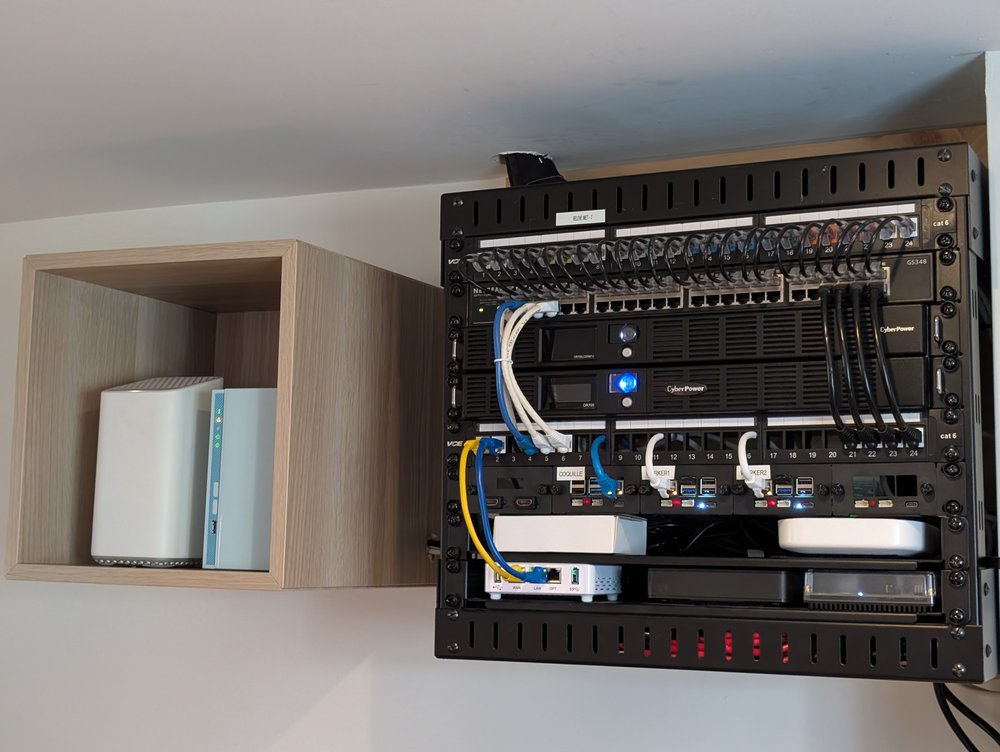
The tray slides in right below the two CyberPower OR700 UPS units and the cat 6 patch panels already in place. The whole rack keeps its usual vertical organization: patching on top, power in the middle, compute at the bottom.
The bonus that’s dormant: the NVMe adapters
The mount includes four PCIe-to-M.2 NVMe adapters, one per Pi 5 slot (plus a spare fourth). I haven’t wired them up yet, all three nodes still run on their current storage, but it’s an open door for later: moving coquille and the worker nodes to NVMe instead of an SD card or USB stick, without touching the physical mount again. Since the rack is UPS-protected, the corruption risk from a power loss is already low. NVMe would mainly be a reliability and speed upgrade for whenever I get around to it.
What lives right next to the rack
The rack doesn’t live alone in that corner of the basement. Right below it, on a small table, sits the Brother all-in-one printer, the one I scan documents with. And to the left of the rack, an IKEA wall cube holding the NAS and a second node of the Helix Fi mesh Wi-Fi.
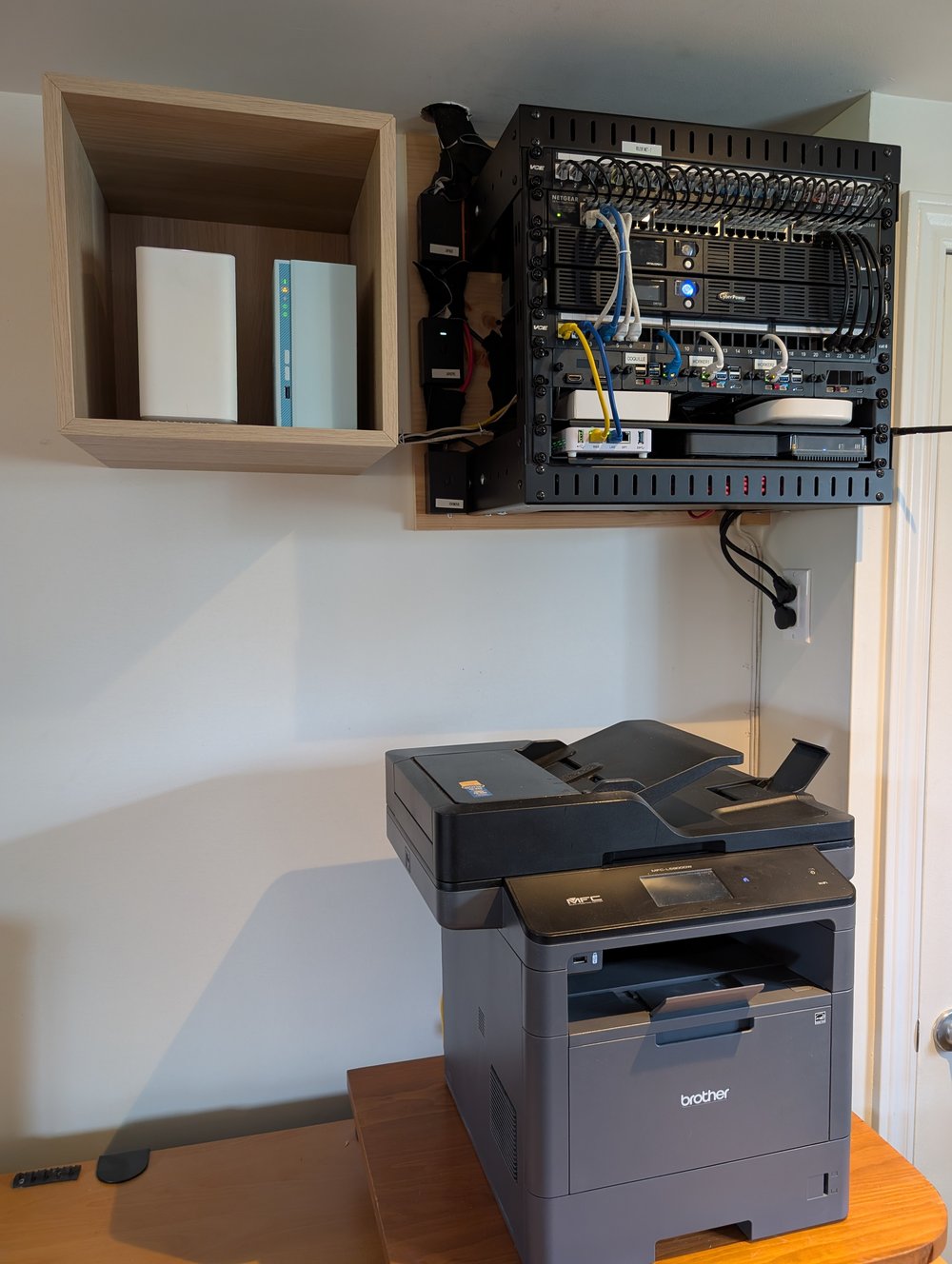
These two photos, along with a few more, are also on Instagram.
The printer isn’t just a printer: it’s the entry point of a small pipeline that ends up in the k3s cluster. A scanned document leaves the device straight over SFTP. I wrote about this before, back when that SFTP server lived on an AWS instance, exposed only through WireGuard. Since then, the service has moved: the SFTP endpoint now runs in its own dedicated namespace inside the k3s cluster, right alongside coquille and the worker nodes in the same rack. Scans land on S3-backed storage, then a post-upload hook cleans up photos and pushes the result to Google Drive via rclone. No local OCR, Google Drive handles that itself on the PDFs.
The NAS and the Helix Fi node don’t need a standard 19-inch rack. They fit more simply into an IKEA cube mounted on the wall, close enough to the rack to stay on the same cabling run.
Result
Three individually accessible, labeled boards, with cabling constrained to a single tray instead of scattered across a shelf. Small change, but the kind that makes a real difference the next time one of these three nodes needs physical attention.
— Ludo