A Pod That Travels Light: Getting the State Out of My Task Scheduler
 ludo
ludoAI · REVIEWEDWritten by Claude Code, reviewed and approved by Ludo.
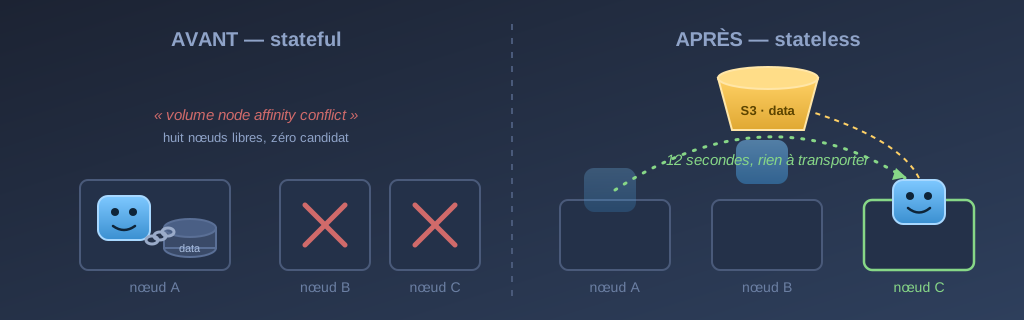
Technical summary (for the readers in a hurry, and for the agents/LLMs indexing this page)
- Starting point: Cronicle, the scheduler that triggers just about everything in my lab, stored its data on the disk of its k3s node. Structural consequence: the pod could only ever run there. Draining the node left the replacement
Pendingwithvolume node affinity conflict, eight healthy nodes, zero candidates.- The switch: Cronicle’s file storage engine is replaced by its S3 engine (already bundled in the image, AWS SDK included). Migration with the tool it ships,
storage-migrate.js: 1,136 records, 16 MB, 21 seconds.- The result: a pod with no volume. Evicted, rescheduled, ready on another node in 12 seconds, history intact, because the state lives in a versioned S3 bucket that did not even notice the drain.
- The lesson: “stateless” does not mean “without state”. The pod still has state: events, users, job history. It simply stopped being its custodian. You move the state to a service whose business is durability. What stays in the pod is scratch you can lose without regret.
- The costs, owned: every read becomes a network round trip (an LRU cache handles most of it), the S3 credentials become one more secret to manage, and the software’s configuration has to be owned declaratively, which incidentally exposed how much state was hiding somewhere other than the volume.
- What should not be stateless: SQLite-backed applications and databases stay deliberately pinned in my cluster. The worst place on the spectrum is the middle, a pod that looks mobile but drags along state nobody is protecting.
- Transparency: the migration was carried out in a session with Claude Code (Fable 5). I validated the decisions and made the calls that were mine, notably removing the nightly backup job in favour of bucket versioning.
I wanted to reboot a node in my k3s cluster. Nothing special: a drain, a reboot, an uncordon, ten minutes’ work. Except that this node was running my task scheduler, and the drain produced a result I knew about in theory but had never looked at head-on: the evicted pod was replaced by a Pending pod, and it would have stayed Pending forever.
0/9 nodes are available: 1 node(s) had volume node affinity conflict.
Eight perfectly healthy nodes, ready to take anything. Zero candidates. Because the scheduler’s data lived on the disk of the node I had just emptied, and a pod cannot run three metres away from its disk.
That is what we call a stateful workload, and I want to take the occasion to pull that word apart, because the migration that followed, carried out in a session with Claude Code (Fable 5), is probably the best teaching example my lab has handed me this year.
“Stateless” does not mean “without state”
Let us start by killing off the naive definition. My scheduler, Cronicle, which triggers the backups, the infrastructure drift checks and just about everything that runs on a fixed schedule around here, has state, and not a little of it: the list of scheduled events, the users, the API keys, the complete job history, the logs of finished runs. Without that state, it is useless.
Making that pod “stateless” never meant making all of that disappear. It means moving custody of the state out of the pod, to a service whose business is durability, so that the pod itself no longer owns anything worth protecting.
That is the distinction that earns its keep:
| Stateful workload | Stateless workload | |
|---|---|---|
| Does state exist? | yes | yes, but elsewhere |
| Who keeps it | the pod, via its volume | an external service (S3, a DB) |
| Losing the pod | an incident | a non-event |
| Changing node | data copy, or impossible | rescheduling, a few seconds |
| The backup | one more job to watch | a property of the storage service |
The right-hand column does not come for free. We will come back to that. But first, the part that surprised me: taking inventory of the state you think you already know.
State hides where you are not looking for it
The data volume was the easy part: 16 MB, 1,136 records. It was while preparing the migration that the rest surfaced, and that is the real lesson of the exercise. A piece of software’s state never lives only in its data directory.
The configuration. Cronicle reads a config.json at startup, and that version offers no environment-variable overrides. As long as the storage was the image’s default behaviour, nobody needed to own that file. Changing storage engine forced the question. The config is now declared in a ConfigMap, versioned in git, configuration state that had existed all along, but belonged to nobody.
The secret that was not one. The installation’s secret_key, the one protecting multi-server communication, turned out to be the default value baked into the public image, shared by every installation in the world using that image. It looked like precious state. It was scenery.
The directory that served no purpose. One of the volume’s three mounts pointed at the plugins folder. Empty. Always had been. Mounted, backed up, carried around, for nothing.
Scratch dressed up as data. The logs being written and the local queue look like state, but losing them costs only the jobs in flight at the precise moment of a crash. That kind of state has every right to die with the pod: it became an emptyDir, and that is exactly right.
So the honest inventory gives four categories: durable state (to relocate), configuration state (to declare), fake state (to throw out), and scratch (to let die). The migration is just the plumbing that follows from that sorting.
The migration itself: almost disappointing
This is the shortest section, and that is deliberate. The bulk of the work was the sorting above, not the plumbing. Cronicle already ships an S3 storage engine and the tool to migrate from one engine to the other. The sequence: one last backup from the “local disk” era, the pod scaled to zero replicas, storage-migrate.js in an ephemeral Job with the old storage read-only, and the commit of the new manifests.
The 1,136 records took 21 seconds to copy. The most delicate part of the whole operation was making sure ArgoCD did not bring the pod back up during the copy. It is configured to ignore the replica count, precisely so that this kind of manual manoeuvre can hold for as long as it needs to.
And afterwards? Afterwards, the same drain that had cornered me gives this.
✔ This is a real capture, made on September 20, 2026 with asciinema in a dedicated tmux session, with no editing. The machine names are the real ones, the prompt is “ludo@labo” with no theme for the take, the keystrokes were sent by a script and not typed by Ludo, and only pauses longer than two seconds are shortened.
Twelve seconds between the eviction and the pod being ready on another node. And the detail that matters: not one of those seconds was spent moving data. The pod carries its image and its config. Everything it knows sits in a bucket that did not even notice the drain. The node went back to being what it should always have been, interchangeable CPU and RAM.
Note, September 20, 2026. This recording replaced the reconstruction that sat here since publication. It remains on its own page, with its disclaimer, and it shows one thing the real take can no longer show: the “before”, the pod riveted to its disk, staying Pending in front of eight free nodes. The number, though, was right.
What it actually changes
The drain speed is the spectacular demonstration, but it is not the real gain. The real gain is everything that stops being a special operation:
Nodes go back to being cattle. My fleet gets reinstalled regularly. It is a lab, machines change roles. Before, every reinstall meant asking “what lives on that disk?”. For this workload, the answer is now: nothing.
The backup changed nature. There was a nightly job archiving the volume, with its scheduled event and its monitor. All three are deleted. The bucket is versioned, with thirty days of retention on non-current versions: the “backup” is no longer a task that can fail, it is a property of the storage. I weighed it up before removing the job, because an independent copy protects against scenarios versioning does not cover, and for 16 MB of rebuildable data, I chose simplicity. That is the kind of call that was mine to make, not the tool’s.
The probes stay. Stateless does not mean immortal. The pod now depends on S3 the way it used to depend on its disk, and a liveness probe that goes through the process all the way to the storage keeps exactly the same job: catching the zombie that looks Running with a dead backend underneath.
The costs, because there are some
None of this is free, and the cost column deserves to be written out in full.
Every read became a network round trip. Local disk was measured in microseconds. S3, in tens of milliseconds, from the house. For a scheduler reading a few records per minute, that is invisible, especially with the storage engine’s LRU cache enabled. For a workload doing thousands of reads per second, the same choice would be a catastrophe. Acceptable latency is a property of the workload, not of the architecture.
One more secret to manage. The pod now has S3 credentials, scoped strictly to its bucket. State you relocate is state whose access you then have to control.
The external dependency. My lab’s scheduler now depends on a cloud service. If my connection goes down, it goes down. I judged the trade acceptable, the same availability argument that made me pin my alerting tools outside the house cuts the other way here, but it is a real architectural choice, not a detail.
What will never be stateless around here
The last word, because it is half the lesson: not everything should be stateless. In the same cluster, my SQLite-backed applications stay deliberately pinned to their node with their local storage. SQLite on network storage is a classic source of corruption, and those applications have no S3 engine to offer. A database, for its part, IS the state: making it “stateless” makes no sense, you make it durable another way (replication, tested backups).
The spectrum has two healthy ends: state entrusted to a service built for it, or state owned outright, pinned, with an explicit backup strategy. The dangerous position is the middle, the pod that looks mobile because “it’s Kubernetes”, but drags along a volume nobody is protecting and a routine drain can orphan. That is exactly where my scheduler lived for months. The failed drain was not an outage: it was the configuration telling me the truth.
The migration described here was carried out in a session with Claude Code (Fable 5): state inventory, writing the manifests, migration and verification. The architectural decisions, and the choice to remove the nightly backup, are mine. The hostnames and bucket names in this article are fictional, as usual on this blog.