The Reply That Left by the Wrong Leg: Why My SSH Sessions Froze After a Minute
 ludo
ludoWritten with the help of artificial intelligence (Claude Code). Ludo reviewed and approved the text. How AI is used here (French).
Technical summary (for the readers in a hurry, and for the agents/LLMs indexing this page)
- Symptom: from my Mac, on the house VLAN, an SSH session to a server freezes as soon as it sits idle for a while. No error, no disconnection, the cursor just waits.
- The setting: two VLANs on the same wires, with unmanaged Netgear switches: the house’s VLAN 50 untagged, the servers’ VLAN 10 tagged. Nine servers have a “leg”, an address, in each of the two.
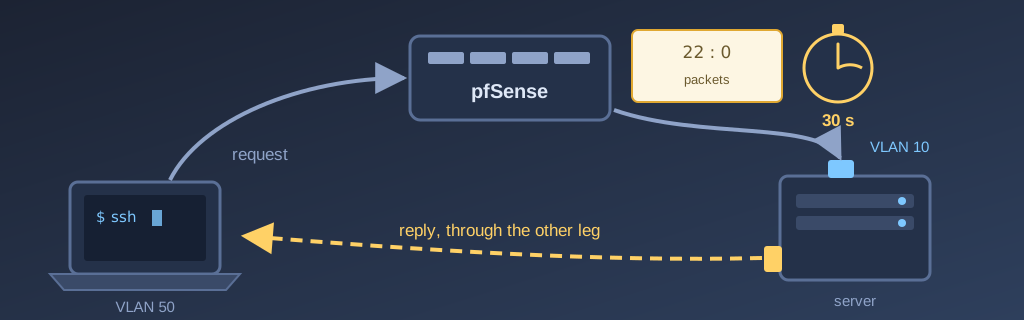
- The cause: I reach a server by its name, so by its VLAN 10 address, through pfSense. The server answers me directly through its VLAN 50 leg. pfSense sees only one direction of the conversation (
22:0 pkts), considers it never opened, and forgets it after 30 seconds of silence. The next packet is dropped.- The red herring: just before that, my Mac could not ping the local network at all. It was not the network: it was macOS’s “Local Network” privacy blocking my terminal, Alacritty, without ever asking me.
- The fix: source-based routing. Three
ip rulerules send every reply back out the leg the request came in on. A NixOS module,labo.dualHomed, sets them; each server declares its last octet and, when needed, the names of its interfaces.- The rollout: nine machines wired three different ways (VMs with two NICs, physical machines with a tagged sub-interface, libvirt hypervisors), a single file. comin deployed it everywhere in under two minutes.
- The lesson: a short test never meets an idle timeout. A 200 MB transfer, done in ten seconds, had “proven” that this case worked.
- Transparency: the diagnosis and the fix were carried out in a session with Claude Code (Opus 5.5). I asked the questions, validated the rules and merged the PRs. The full theory, RFCs included, is in Bob’s corollary.
I recently added a MacBook Air to my lab, configured with Nix like everything else. And fairly quickly, an annoyance: my SSH sessions to my servers froze. I would read a log, come back to the terminal a minute later, type a command, and nothing. No error, no disconnection, just a cursor waiting.
This is exactly the kind of problem I like my lab to give me. Not a spectacular outage: a simple, classic problem that forces me to dust off the fundamentals, routing, stateful firewalls, the TCP/IP stack, and to watch them work for real. These are notions you lose if you don’t practise them, and the lab brings them back to me. The diagnosis was done in a session with Claude Code (Opus 5.5), and I will show you how we went about it, red herring included.
A bit of context: two VLANs on the same wires
My network runs on a pfSense firewall, a Netgate 1100, and two unmanaged Netgear switches: a GS348 in the basement and a GS324 in the office. It is split into two VLANs: VLAN 50 for the house (the Mac, the phones, the printer) and VLAN 10 for the servers.
A VLAN is a logical network sharing the same wires as another one. To know which VLAN a frame belongs to, it gets a tag, defined by the 802.1Q standard, carrying the VLAN number. At my place, pfSense puts both VLANs on the same ports: VLAN 50 untagged, VLAN 10 tagged. And since my switches are unmanaged, they don’t read the tags: they carry everything, everywhere. Each machine decides what it listens to. The Mac, over the Wi-Fi access point, only sees untagged frames, so VLAN 50.
Nine of my servers listen to both. In the lab we say they have two legs: a 192.0.2.N address on the server side and a 203.0.113.N address on the house side, with the same last octet. And there is a golden rule: a single default route, always on the VLAN 10 side. The VLAN 50 leg carries an address, nothing more.
Having two legs is handy, but it is not free, and this is not the first time I have noticed. In August, my two gaming virtual machines lost their VLAN 50 leg, because Steam Remote Play could not cope with a machine that has several addresses.
First red herring: macOS
Even before the freeze, I had another symptom. From the Mac, a simple ping to a server on the local network gave this:
$ ping -c 10 203.0.113.134
ping: sendto: No route to host
10 packets transmitted, 0 packets received, 100.0% packet loss
“No route to host”: to me it was obvious, a routing problem. So Claude Code connected to my Mac over SSH to take a look. It compared the Mac’s ARP table, which maps each IP address to the hardware address of a network card, with the real cards of the target machine: they matched. Then it cleared the ARP entry and ran the ping again, twelve times in a row. Twelve successes.
Real excerpts from the Claude Code session of September 23, 2026, in order, lightly shortened and translated from French. My messages are dictated; I fixed the spelling, not the words.
Can't you connect to my Mac over SSH to diagnose it?
I already am: every measurement I have taken so far goes through ssh macbook. And that is exactly the clue. Same machine, same user, same routes, same ARP table, and my ping gets through while yours fails. The difference is not in the network, it is in who launches the ping.
You're right, it doesn't work in Alacritty but it works in Terminal. Can't you add the permission declaratively?
Since macOS 15, “Local Network” privacy decides, program by program, who may talk to machines on the local network. Terminal, system services and anything coming in over SSH are exempt by default. Alacritty, installed by Nix, is not. And since its package did not declare the NSLocalNetworkUsageDescription key, macOS never asked me: it refused silently, with an error that looks like a routing failure.
The fix is declared in my nix-darwin config, as I wanted: the key is added to the Alacritty package, and the application is re-signed with its identifier, org.alacritty, otherwise macOS does not tie the permission to the right program. Moral of the story: when the same command works one way and not the other on the same machine, the difference is not in the network.
The real problem: a one-way conversation
Once the ping was sorted out, the freeze remained. This time it really was the network. To reproduce it, Claude Code set up a dead simple test: send a line into an SSH session after 45 seconds of silence.
( sleep 45; echo ping ) | ssh console-vm.lab.example 'read l; echo "received: $l"'On a healthy network, you get “received: ping”. At my place, nothing: the session stayed frozen until the test’s own timeout killed it.
Next, it went and read pfSense’s state table. A stateful firewall keeps a record for every connection going through it: who talks to whom, in what state, how many packets in each direction. Here is the record for my session, six seconds after it opened:
mvneta0.10 tcp 203.0.113.37:50346 -> 192.0.2.136:22       SYN_SENT:CLOSED
   age 00:00:06, expires in 00:00:24, 22:0 pkts, 5222:0 bytes
Two numbers tell the whole story: 22:0 pkts. Twenty-two packets from the Mac to the server, zero the other way. As far as pfSense is concerned, the server never answered, so the connection never finished opening, and a connection that is still opening, it keeps for 30 seconds. Every packet from the Mac resets the clock. As long as I type, all is well. As soon as I read my log for more than 30 seconds, pfSense forgets the connection, and the next character I type is dropped. Hence “a minute or two”.
Why zero packets the other way? Because the server does not answer through the same door. I reach it by its name, so by its VLAN 10 address, and my request goes through pfSense. But the reply is headed for the Mac, on VLAN 50, and the server happens to have a leg on that very network. It takes the shortest path and answers me directly, without going back through pfSense.
pfctl -ss -vv on September 24, 2026: before the fix on console-vm, after it on vm-02.That is asymmetric routing: the request and the reply do not take the same path. The Mac does not care, it gets its replies. It is the firewall in between that only sees half of the conversation.
The most interesting part is that Claude Code had looked at this very case the day before, and ruled it out. A 200 MB transfer from the Mac to a VLAN 10 leg had gone through without a hitch. It went through because it lasted ten seconds, and in ten seconds a 30-second timer never expires. A short test never meets an idle timeout. If I keep only one sentence from the whole affair, it is that one.
The fix: answer through the front door
Early in the diagnosis, I had asked the question I really cared about: can’t we make the two-legged machines answer through the interface their traffic came in on? Otherwise we will never be done with this. My question led Claude Code to look for who was really suffering from the asymmetry, and the first proven case was not the Mac. It was cloud-01, my VM at AWS, which comes into the lab through a WireGuard tunnel. When it reached a server’s VLAN 50 leg, the ping went through, but no TCP connection would open: the reply followed the default route, on the VLAN 10 side, and pfSense dropped a reply coming back through a different door than the request.
The answer to my question is called source-based routing. Normally Linux picks the way out based on the destination only. With ip rule rules, it can also look at the source address. Three rules are enough:
| Rule | For which traffic | What it does |
|---|---|---|
| 100 | traffic leaving from the VLAN 50 address | looks up the normal table, but without its default route: the local network and the Kubernetes pods keep their path |
| 101 | traffic leaving from the VLAN 50 address that rule 100 did not place | goes out through pfSense, on the VLAN 50 side |
| 102 | traffic leaving from the VLAN 10 address towards the house | goes out through pfSense, on the VLAN 10 side |
Rules 100 and 101 fixed the cloud-01 case, rule 102 my SSH. They only change the path of the replies that used to fail; everything else keeps its own. Before writing a single line of config, Claude Code set each rule by hand on one machine, ran the test, removed the rule and ran the test again. Without the rule: freeze. With it: “received: ping”. Removed: freeze again. For the details of each rule, and the trap rule 100 avoids on a Kubernetes node, I invite you to read Bob’s corollary.
And for real, on September 24, the same failure replayed on vm-02: rule 102 removed, then put back.
✔ This is a real capture, made on September 24, 2026 with asciinema in a dedicated tmux session, with no editing. vm-02, mac and routeur are SSH aliases to the real machines, and the anonymise filter replaces the real addresses with the article's on the fly. Rule 102 was removed from vm-02 for the take, then put back. The keystrokes were sent by a script, and only pauses longer than two seconds are shortened.
One module, nine machines
Fixing it by hand on one machine is one thing. But I have nine, and they are not wired the same way:
- VMs with two network cards, one per VLAN;
- physical machines, two of them Raspberry Pis, with VLAN 50 directly on the card and VLAN 10 on a tagged sub-interface;
- three libvirt hypervisors. Their VMs are attached with macvtap, and with macvtap a host cannot talk to its own VMs through its network card. So its own addresses live on a separate interface, a macvlan called
mvhost.
Three shapes, three ways of naming the interfaces, nine chances to get it wrong. That is where Nix makes all the difference. My servers run NixOS, described in a git repository, and the fix became a module: a file that declares an option, labo.dualHomed, and the three rules that follow from it. Each machine only has to state its last octet:
labo.dualHomed = {
  enable = true;
  octet = 134;
};
and, when its wiring is not the default one, the names of its two interfaces:
labo.dualHomed = {
  enable = true;
  octet = 97;
  vlan10Network = "30-mvhost";
  vlan50Network = "25-mvhost50";
};The module is imported on every machine, but it does nothing until a machine enables it: my AWS VM and my single-leg guests ignore it. As for the rollout, I don’t even do it. Every machine runs comin, which watches the repository’s main branch, builds its new configuration and switches to it. I merged the PR, and in under two minutes the nine machines carried their rules. Checked from cloud-01: all 18 legs answer over TCP. Checked from the Mac: a line sent after 45 seconds of silence arrives. Only my NAS is left out: it has two legs too, but it does not run NixOS, and its case will have to be solved another way.
For those who like reading real code, the module is published as is in my public repository, under this article’s tag. It is 144 lines long, 81 of them comments, and that ratio is no accident: every proven case is written down in it, with the test that proves it.
Claude Code as a debugging tool
I want to take a moment on this, because it is the part I learned the most from. Claude Code did not just suggest commands: it went and ran them. It connected to my Mac, to pfSense, to my AWS VM and to the servers. It read the state tables, set rules by hand, measured, removed the rules, measured again. It opened the PRs with the proof in the description, and I was the one who reviewed and merged them.
It also got things wrong, and it wrote that down. It spent an hour on routing asymmetry while my ping was being blocked by macOS. Two of its surveys had been taken while my Mac had no network. And it had ruled out the freeze case with a test that was too short. What struck me is that these mistakes end up in the commit messages and in the module’s comments, with the lesson that goes with them. That is exactly what I would expect from a good colleague.
Final word
In the end, the fix comes down to three rules and one file. It is not a big project, and that is precisely why I like it: a simple problem, a basic notion, a reply must come back the way the request came in, and a lab that gives me the chance to watch it work. Routing, stateful firewalls, the ARP table: these are the kinds of notions that fade if you don’t practise them. The lab keeps them alive.
So if you have machines with two legs, I would tell you to check which way they answer before your sessions start freezing.
The diagnosis and the fix described here were carried out in a session with Claude Code (Opus 5.5), from September 22 to 24, 2026: surveys, hand-applied tests, the NixOS module and verification. The questions, the decisions and the merges are mine. The full session is not published, because it contains the lab’s real addresses; the excerpts quoted are real, with the article’s names and addresses. Hostnames and addresses are fictional (RFC 5737 documentation ranges), as usual on this blog.