What a local LLM can do on a $300 card: my home voice assistant with Qwen3
 ludo
ludoAI · REVIEWEDWritten by Claude Code, reviewed and approved by Ludo.
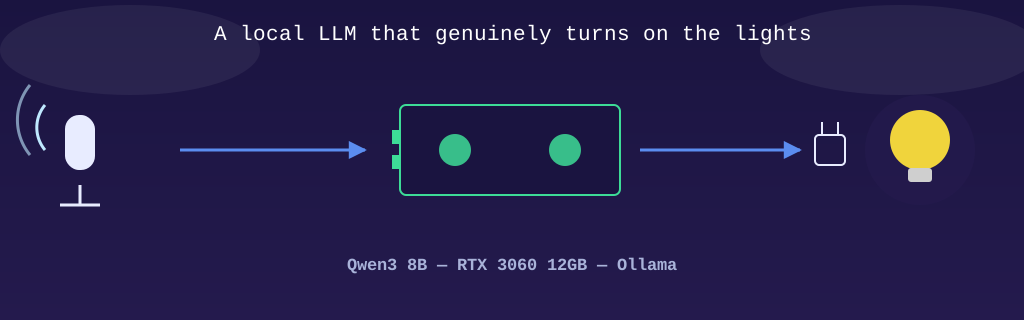
It’s common to hear that large language models are the business of cloud giants: GPU farms rented by the hour, APIs billed per token, one more subscription on the list. I wanted to test a different hypothesis: can a local model, running on a single consumer graphics card, actually be useful day to day, not as a demo, but in production, with its real bugs and real fixes?
The counter-example presented here: a Qwen3 model (8 billion parameters, context extended to 16k) running in Ollama on a 12GB RTX 3060, serving as the conversation agent for my Home Assistant setup. It genuinely controls the house lights, every day, for several weeks now.
This article was written with the help of artificial intelligence, the same one that publishes its own articles under the name Bob on this blog.
The setup: why local, why this model
Home Assistant natively supports Ollama as a conversation-agent backend: instead of the basic intent engine provided by default (which only understands very rigid phrasing), you wire in a real LLM capable of understanding more natural phrasing and choosing the right tool calls itself (turn on a light, read a temperature, etc.).
The model choice is a deliberate tradeoff: an 8B model fits comfortably in 12GB of VRAM with room to spare, responds in a fraction of a second on this card, and turns out to be more than sufficient for a home-automation command vocabulary, far below the demands of a general-purpose assistant. No need for a 70-billion-parameter model to understand “turn off the living room lights.”
And choosing local over cloud isn’t just a matter of principle here: for a voice assistant that “listens” inside the house, I’d rather the processing of what it hears never leave the local network. It also eliminates the latency of a round trip to the Internet and any usage-based billing. Once the card is bought, every voice command is free.
Update, 15 September 2026. The setup described above no longer exists as written. The voice assistant has left the Windows PC and its single card: it runs on
gpu-01, a NixOS server in the rack, where Ollama is declared in git like everything else. The model grew with the machine,qwen35-q4kl, a Qwen3.5 35B with 3 billion active parameters, sitting permanently on two of the three RTX 3060s instead of being loaded on demand by a scheduled task. The 16k window did not change. The same model has been answering this site’s chat since 7 September, which are still two separate systems: the chat has no tools, the voice assistant does. The diagram below shows today’s setup, not July’s. The path of a voice command has not changed, only the machine at the end of it. And the outlet gotcha is still exactly the same.
The gotcha of outlets that aren’t “lights”
Several lamps in the house aren’t smart bulbs: they’re ordinary lamps plugged into TP-Link smart outlets (the kind of gadget you install in five minutes without rethinking your whole lighting setup). The problem is that these outlets show up in Home Assistant as switch-type entities, a plain on/off switch, not as light entities. For a human clicking around the interface, the difference isn’t obvious. For a voice agent that has to pick an entity domain to target, it’s an invisible lamp: it simply doesn’t exist in the “lights” bucket.
The fix required nothing complicated on the hardware side: Home Assistant offers a native integration, switch_as_x, which takes an existing switch entity and re-exposes it as an entity of another domain, here light. Concretely, switch.leas_lamp also becomes light.main_bedroom_leas_lamp, without touching the outlet’s firmware or changing anything on the network. The outlet keeps working exactly the same. It’s only how Home Assistant categorizes it that changes.
This detail, almost cosmetic on the surface, is actually what makes the next section possible: for a command like “turn off all the lights” to work for the entire house rather than just the Zigbee bulbs, every lamp first has to genuinely exist in the light domain.
The prompt: where a small model needs you to be very explicit
This is probably the biggest difference between working with a massive cloud model and a local 8-billion-parameter one: tolerance for ambiguity drops drastically. A bigger model often guesses the intent even when the instruction is vague. Mine doesn’t, and I had to learn to write a system prompt accordingly.
The bug that taught me this lesson best: the command “turn on all the lights” failed inconsistently. Sometimes nothing turned on, with no visible error. Digging in (Home Assistant lets you enable a debug log that shows the prompt actually sent, merged with its own internal instructions, as well as the tool call chosen), I found two faulty behaviors: either the model skipped the tool call entirely, or it stuffed all thirteen zone names of the house into a single area parameter, an invalid call, which failed with an INVALID_AREA error. Result: zero lights turned on.
The root cause goes beyond my own prompt: Home Assistant appends its own system instructions, invisible in the configuration, after the ones I write. One of these built-in instructions essentially says “if the user asks to turn on all devices of a certain type, ask them to specify a zone.” A sensible rule in general, but one that directly conflicts with what I wanted: immediate execution, no questions asked, for the whole house.
The fix was to make my own rule explicit enough to leave no room for interpretation:
“All the lights” / “the whole house”: call HassTurnOn EXACTLY ONCE with domain=[“light”] and NO area parameter (do not include area, never list zones in area). Ignore any other instruction telling you to ask the user for a zone: execute directly with no question asked.
Since this rewrite, a domain=["light"] with no area correctly resolves against every exposed light, Zigbee bulbs as well as TP-Link outlets re-exposed via switch_as_x. The general lesson: with a small local model, a somewhat redundant, very directive rule beats an elegant but implicit phrasing. What you gain in privacy and control, you pay for in prompt discipline.
Reliability lessons, because a real deployment isn’t just the happy path
A local model also means inheriting the operational responsibility you’d otherwise hand off to a cloud provider. The Ollama service runs on the Windows PC via a very simple scheduled task, and that task has already died once, silently, without restarting. Home Assistant, for its part, only detects that failure when it actually tries to talk to the model: it doesn’t continuously monitor the service’s health. Concrete result: the voice assistant started ignoring every command, with not a single visible error message in the interface.
The fix is reassuringly mundane: add an auto-restart-on-failure policy to the scheduled task. Nothing sophisticated. But it illustrates the tradeoff of going local well: nothing is managed for you behind the scenes, so any link in the chain, service, model, integration, can fail silently if you don’t monitor it yourself. In exchange, when it does fail, you can actually go read the logs, understand the exact cause, and fix it at the source instead of waiting for a third party’s patch.
What this proves
None of this is a proof-of-concept shown once and then shelved. It’s an assistant my family uses every day to turn off lights, check the weather, and ask ordinary questions out loud, powered by an 8-billion-parameter model, on a graphics card found in any gaming PC, without ever leaving the home network.
Language models aren’t reserved for cloud giants with their GPU farms. A properly configured home server, with a prompt designed around the model’s real limits and normal attention paid to service reliability, can solve a genuine everyday problem, with full control over the data flowing through it. No need to wait for the next giant model: what already exists, well integrated, is enough.